Summer comfort
We examine temperature profiles in critical rooms. Options may include different glazing, external shading, thermal mass and night ventilation.
More about thermal simulationHow warm will a room get in summer? How much cooling capacity is needed? How do the facade, shading and ventilation work together? TIAN Building Engineering investigates these questions using dynamic building models for new construction, existing buildings and refurbishment.
Engineering services from Berlin for projects in Germany and internationally.
Building simulation represents the behaviour of a building or individual rooms in a computer model. A dynamic model calculates how temperatures, heat flows and heating or cooling demand change with weather, occupancy and system operation. It accounts for heat storage in building components, solar radiation and internal gains from people, lighting and equipment.
This makes it possible to investigate whether an office overheats despite shading, how night ventilation performs or how different facades affect energy demand. We tailor the model and its evaluation to the specific design question.
Thermal and energy building simulation evaluates rooms and zones over time. Complementary CFD simulation resolves airflow and temperature distributions in space, for example to assess air outlet positions or draught risk. Daylight calculations with Radiance extend the assessment of facades and natural lighting.
For thermal and energy calculations, our tools include EnergyPlus. The combination of methods depends on the building, its use and the decision to be supported.
It is particularly useful when simplified assumptions cannot adequately capture the interactions between a building, its use and its systems.
We examine temperature profiles in critical rooms. Options may include different glazing, external shading, thermal mass and night ventilation.
More about thermal simulationHeating and cooling loads and demand profiles help assess system concepts and operating schedules. Comparing options reveals trade-offs between comfort and energy demand.
More about energy simulationWindow areas, shading and orientation affect daylight and solar heat gains at the same time. Assessing them together supports coordination between architecture and building services.
More about window and facade systemsFor existing buildings, operating data and measurements can help narrow down assumptions. For new construction, design options can be compared early in the planning process.
We start with a specific question. It defines the model scope, boundary conditions and design options to be compared.
We discuss building use, critical rooms, the design stage and target values. This establishes which decision the simulation should support.
We bring together geometry, construction details, weather data, loads and operating schedules. Missing information and assumptions are documented clearly.
A baseline and agreed alternatives are assessed under comparable boundary conditions. Model assumptions and results are checked for plausibility.
We compare key indicators and time series and explain what they mean for facades, ventilation, cooling or operation.
For an initial assessment, your design question and available documents are sufficient. We agree the required level of detail with you.
The agreed scope determines the evaluation. Typical outputs connect a technical metric with a specific design decision.
| Output | What it shows | How you can use it |
|---|---|---|
| Room temperatures and comfort | Time series and the frequency of critical conditions under the agreed occupancy assumptions | Compare shading, night ventilation and cooling concepts |
| Heating and cooling loads | Required capacity and the timing of peak loads in the rooms or zones studied | Review sizing assumptions and system concepts |
| Energy demand and load profiles | Calculated demand over time and differences between design options | Coordinate the building envelope, systems and operating strategies |
| Daylight and solar gains | Natural lighting and heat gains depending on the facade and shading | Assess window proportions and shading together |
The report includes the key assumptions, boundary conditions and interpretation of the options. Calculated energy demand is a model-dependent prediction. Actual consumption also depends on real occupancy, weather and operation.
Our references cover different building types and combinations of simulation methods.
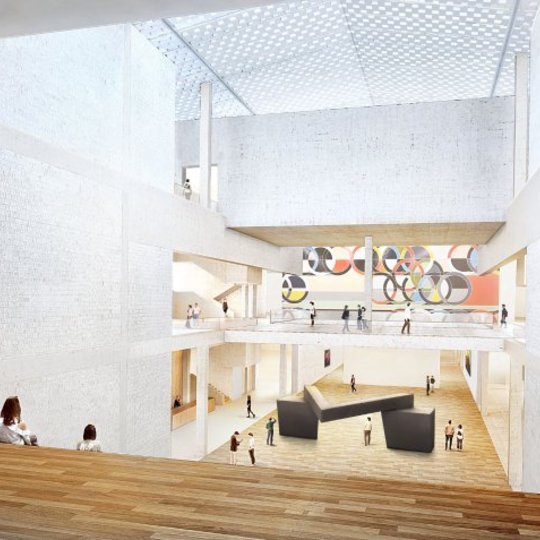
For National Galerie 20, we combined building, thermal and airflow simulation with daylight calculations. The work connects whole-building assessment with the analysis of indoor climate and natural lighting.
Scope: Building, thermal, airflow and daylight simulation.
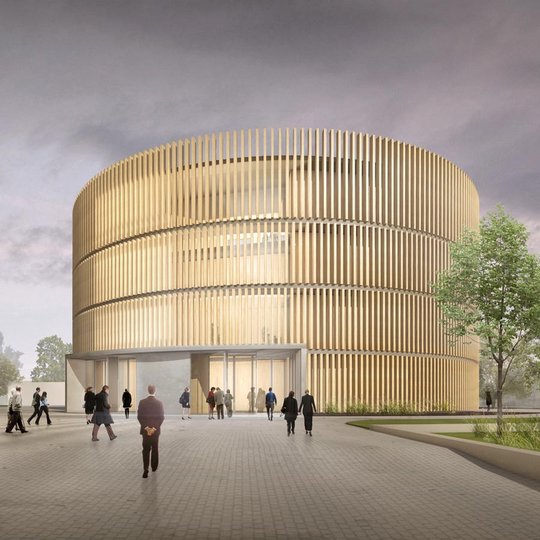
Our work on the new theatre in Coburg included thermal simulation and CFD. The investigation therefore covers both thermal behaviour and spatial airflow.
Scope: Thermal simulation and CFD.
Depending on the method, a static calculation uses defined conditions or aggregated indicators. A dynamic simulation examines changes over time and accounts for factors such as heat storage in building components. The appropriate method depends on the question being addressed.
Early on, fundamental decisions about facades, shading and system concepts can be compared. Later stages can focus on specific rooms, operating scenarios or sizing questions. We adapt the model to the data available.
Yes. It can help compare refurbishment options and changes to operating strategies, or investigate comfort problems. Available consumption data and measurements support plausibility checks on the model.
A suitable BIM model can support data preparation. A simulation model can also be developed from floor plans, sections and construction information. We clarify the documents needed for your project before work starts.
Effort and delivery time depend on factors such as building size, number of zones, data quality, design options and evaluation scope. Based on your documents and design question, we prepare a project-specific proposal with an agreed schedule.
Depending on the commission, you receive a report covering model assumptions, boundary conditions, indicators, time series and comparisons of design options. We explain what the results mean for the agreed design question.
Tell us about your building, its design stage and the decision you need to make. We will discuss the appropriate simulation scope and required data with you.